Shopify Email Dynamic Product Sections: How Merchants Can Automate Product Merchandising
How Shopify Email Dynamic Product Sections work: automatically surface best sellers or recently added products in campaigns and automations, and when to use them vs static blocks.
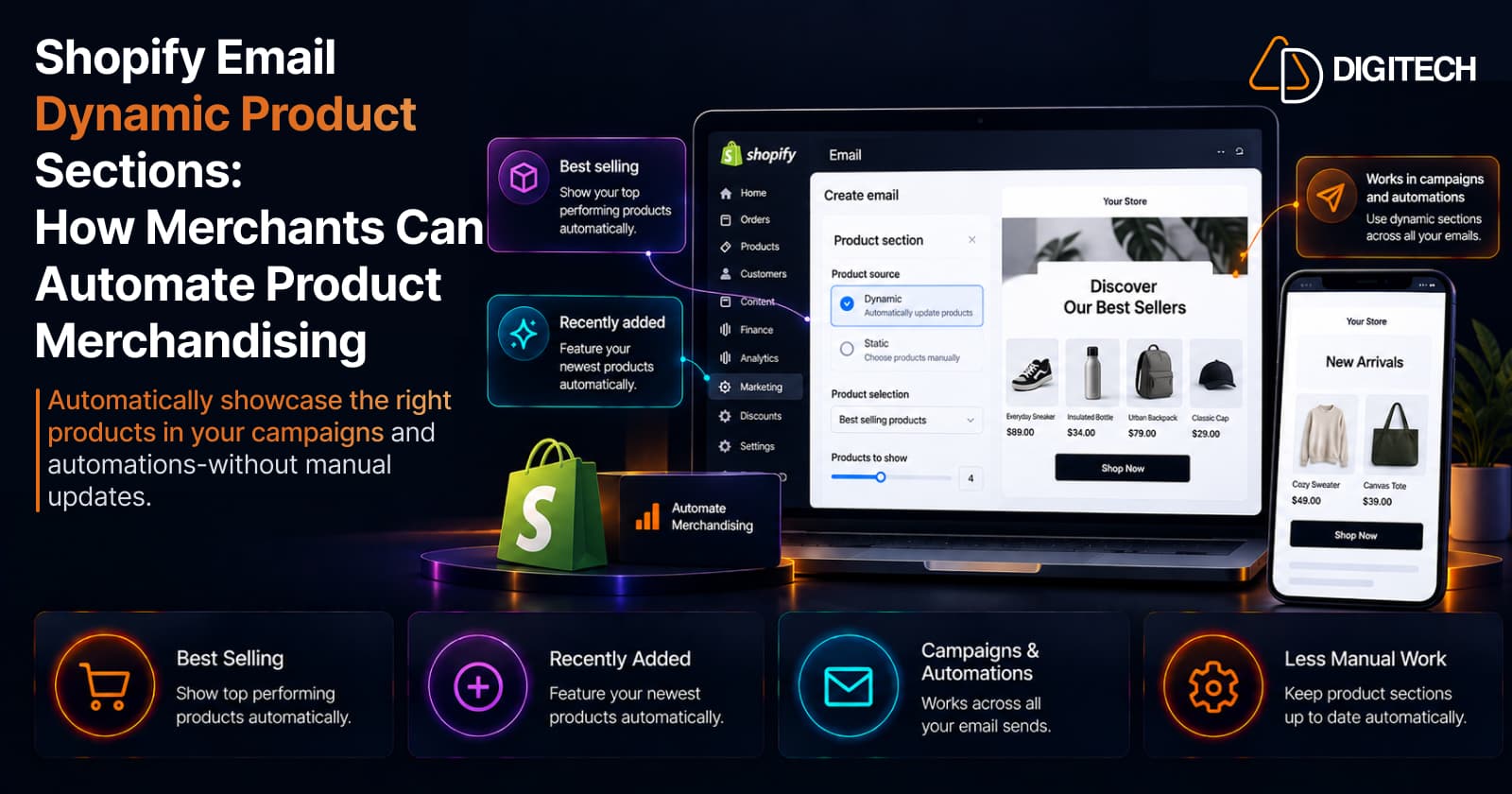
Building a product email usually means picking products by hand. You choose the items, place the blocks, and check the prices. Then the catalog moves on. Best sellers change, new stock lands, something sells out, and last month's featured products are no longer the ones you'd choose today. For a store that emails often, keeping those product blocks current turns into steady, low-value maintenance work.
Shopify Email addresses part of that problem with dynamic product sections. Instead of deciding which products appear in every send, you can let Shopify Email populate a product block automatically from your current store data. This guide explains what that feature does, how it differs from picking products manually, and when each approach is the right call.
What are Shopify Email Dynamic Product Sections?
A dynamic product section is a product block that fills itself in. When you add a product section to a Shopify Email template, you can set it to Dynamic and choose one of two rules: best selling products or most recently added products. Shopify introduced this on September 25, 2025, and it works in both email campaigns and automations.
The difference from a normal block comes down to who decides what appears:
| Dynamic product section | Static product section | |
|---|---|---|
| Who picks the products | Shopify, based on the rule you choose | You, by hand |
| When products are decided | At the time the email is sent | When you build the email |
| Product details (title, image, price) | Pulled from your catalog automatically | Pulled from the products you selected |
| Manual control | You can't hand-pick or edit item text/image | Full control over every item |
You still control the important decisions: whether a section is dynamic at all, which rule it uses, and where it sits in the email. What you hand over is the per-send product picking.
How dynamic product sections work
The flow is simple, and it happens at send time rather than when you design the email:
- You build the email and add a product section set to Dynamic (best sellers or most recently added).
- When the email is scheduled or triggered, Shopify looks at your current catalog.
- It selects the products that match the rule at that moment.
- It fills the block with those products, using their live titles, images, and pricing from your store.
- Every recipient of that email sees the products selected at send time.
Because the selection is made when the email goes out, an automation you set up once keeps surfacing current products weeks later without you touching it. A newer option also lets you point a dynamic section at a specific collection and feature its best sellers or most recently added products, which is useful when you want the automation scoped to one part of the catalog.
Best sellers vs most recently added
The two rules serve different merchandising jobs. Pick the one that matches what the email is for.
| Best sellers | Most recently added | |
|---|---|---|
| What it surfaces | Top-performing products at send time | Newest products in the catalog at send time |
| Best for | Evergreen merchandising, proven demand | New arrivals, launches, fresh assortment |
| The message it sends | "Here's what's popular right now" | "Here's what's new right now" |
| Advantage | Features products already converting | Keeps new stock visible with no manual updates |
| Watch out for | Can repeat the same items when sales are steady | New products may be unproven or thin on stock |
| Example email | A weekly best-sellers roundup | A "just landed" new-arrivals email |
Dynamic vs static: which should merchants use?
Neither is better in general. The right choice depends on how much control the campaign needs.
Dynamic is the better fit when:
- The product selection can reasonably change from send to send.
- You want less manual maintenance on recurring emails.
- The goal is ongoing merchandising rather than a specific promotion.
- "Current best sellers" or "current new arrivals" genuinely matches the email's purpose.
Static is the better fit when:
- A specific product or SKU has to be promoted.
- A launch campaign depends on exact products and creative.
- A seasonal promotion has a predetermined product list.
- You need precise control over the items, order, and copy.
A practical rule: use dynamic sections for the recurring, "keep it current" emails, and static sections for the campaigns where the exact products are part of the story.
Where dynamic product sections fit into Shopify Email
Dynamic sections are useful across a range of email work:
- Recurring campaigns such as a weekly or monthly product email.
- Automations where the same flow runs for months and you want it to stay current.
- New-product and new-arrivals emails that should reflect the latest catalog.
- Product-discovery emails that reintroduce customers to what's selling.
Treat them as one component of an email program, not the whole thing. Dynamic sections decide which products a block shows; they don't handle who receives the email, how the audience is segmented, or the offer and copy around the products. Those remain your decisions.
Dynamic merchandising is not the same as personalization
This is the distinction most worth getting right, because the two are easy to conflate.
Dynamic merchandising answers a store-level question: given my catalog right now, which products should this block display? The answer (best sellers or newest products) is the same for everyone who receives that email.
Personalization answers a customer-level question: given this specific person's behavior, preferences, and purchase history, which products should they see? That requires individual customer signals, and it can differ for every recipient.
Shopify Email's dynamic product sections do the first, not the second. Two customers with very different tastes who both receive your weekly email see the same dynamically selected products. That's genuinely useful, and it removes real manual work, but it isn't one-to-one recommendation. If individualized product recommendations are central to your strategy, you'll need deeper segmentation, richer customer data, or a solution built for that, rather than assuming a dynamic block covers it.
Practical examples for Shopify merchants
- Weekly store email. Set the product section to best sellers so the email always leads with what's currently popular, with no weekly rebuild.
- New-arrivals email. Use most recently added so the block reflects the latest products the moment the email sends.
- Evergreen automation. In a customer journey that runs for months, a dynamic section keeps surfacing current products long after you built the flow.
- Collection-focused send. Scope a dynamic section to a specific collection and feature its best sellers, for example a "top of [category]" email.
- Large catalog. For stores adding products constantly, dynamic sections cut the maintenance of keeping product blocks accurate across many emails.
- Seasonal merchandising. When the exact products aren't critical and "what's selling this season" is the point, dynamic selection fits; when the promotion hinges on specific items, switch to static.
What to check before using dynamic product sections
Dynamic sections are only as good as the catalog they pull from. Before you rely on one, confirm:
- Product data is accurate so whatever gets surfaced represents the product correctly (a companion to broader product data hygiene).
- Titles and images are email-ready, since you can't edit them inside a dynamic block.
- Pricing is correct, because it's pulled live from the catalog at send time.
- Availability makes sense, so you're not featuring items about to run out.
- The rule matches the objective (best sellers vs most recently added) for that specific email.
- Static is the right call instead, when the campaign needs exact products.
- You've previewed and tested the email, including how the block renders on mobile and that the product links work.
When Shopify Email is enough, and when you need more
Shopify Email is a solid fit when you want straightforward, product-focused campaigns and automations inside Shopify, and dynamic merchandising covers your product-selection needs. For many stores, that's plenty, and staying native keeps the workflow simple and connected to the catalog.
You may outgrow native functionality when your strategy leans on individualized behavioral recommendations, complex customer segmentation, combining several external customer-data sources, or advanced lifecycle and multi-channel messaging. Those are the points where a more advanced platform, or a custom-built solution around your Shopify data, starts to earn its cost. Merchandising ideas like post-purchase product recommendations and a genuinely well-structured product catalog also matter more as you push past the basics.
The bottom line
Shopify Email's dynamic product sections reduce manual merchandising by automatically displaying relevant store products, using supported rules such as best sellers and most recently added, chosen at the time each email is sent. They keep recurring emails current and cut maintenance, especially for stores with large or fast-moving catalogs.
The key is knowing what they are and aren't. Dynamic sections automate merchandising at the store level. They do not personalize products for each individual customer. Use dynamic sections for the recurring, keep-it-current emails, keep static sections for campaigns that hinge on exact products, and reach for more advanced tooling only when true customer-level personalization is the goal.
If your Shopify store needs product recommendation, merchandising, or customer-data workflows that go beyond native Shopify features, AD Digitech can help design and build a solution around your existing Shopify stack. See our Shopify store development work, or talk to us about what you're trying to build.
Frequently asked questions
What are Shopify Email Dynamic Product Sections?
They're product blocks in Shopify Email that populate automatically instead of being hand-picked. When you add a product section you can set it to Dynamic and choose best selling or most recently added products; Shopify then fills the block with those products from your catalog at the time the email is sent.
When did Shopify introduce Dynamic Product Sections?
Shopify added dynamic product sections to Shopify Email on September 25, 2025. They're an existing, available feature in 2026, supported in both email campaigns and automations.
How do Shopify Email dynamic products work?
You add a product section to the email, select Dynamic, and choose best sellers or most recently added. When the email sends, Shopify looks at your current catalog and drops in the matching products, pulling their titles, images, and pricing directly from your store. The selection is made at send time, not when you build the email.
What is the difference between dynamic and static product sections?
A static section is a fixed list of products you choose by hand, with full control over exactly what appears. A dynamic section is populated by Shopify from a rule (best sellers or most recently added), so it stays current on its own but you can't manually adjust which products show or edit their text and image.
Can Shopify Email dynamically recommend products to each individual customer?
No. Dynamic product sections select products based on store and catalog data (such as what's selling best or what's newest), not on an individual recipient's browsing or purchase history. Every recipient of the same email sees the same dynamically selected products. That's automated merchandising, not one-to-one personalization.
When should a merchant use Shopify Email versus a more advanced personalization solution?
Shopify Email is a good fit when native campaigns, automations, and dynamic merchandising cover your needs and you want to stay inside Shopify. A more advanced platform or custom solution is worth considering when individualized product recommendations, deep behavioral segmentation, or combining multiple external customer-data sources are central to your strategy.
Building something on Shopify?
We design, build, and maintain Shopify apps, stores, and AI products — to the standard this article describes.
Related reading
Shopify Store Maintenance: What to Handle In-House vs. Outsource
Shopify runs the platform; your theme, apps and integrations are yours to maintain. What to handle in-house, when to hire a developer and what support covers.
Read article
Shopify Adds Stock Counts in Admin: How Merchants Can Verify Inventory Before Peak Season
Shopify stock counts let staff record what's on the shelf and let a manager approve the differences before inventory changes. Here's how the workflow works in admin and POS.
Read article
Shopify Adds Arabic, Urdu, and Hebrew Support: What Merchants Must Check Before Launch
Shopify improved RTL support for Arabic, Urdu and Hebrew in the admin, storefronts and checkout. Here's what's covered, what isn't, and what to test before launch.
Read article
Shopify Translate & Adapt Auto-Sync: How to Keep Translations Current Before BFCM
Translate & Adapt can now update translations weekly with Auto-sync. Here's who can use it, how it differs from Translate now, and how to plan translations before BFCM.
Read article
Shopify Flow Shipping Label Automation: Setup, Rules, and What Merchants Should Test Before BFCM
Shopify Flow can now buy shipping labels automatically for orders that match your rules. Here's how the action works, example workflows, and what to test before BFCM.
Read article
Shopify Automated Policies: 7 Things Merchants Should Check Before Enabling Them
Shopify can now generate and update your return, shipping, terms of service and contact policies from your store settings. Here's what to check before you turn automation on.
Read article
Shopify Purchase Order Analytics: How to Spot Stock Risks Before BFCM
Shopify Analytics now includes purchase order reports. Here's what each report shows, how to use them to spot stock risks before BFCM, and what they can't tell you.
Read article
Shopify Rollouts: How Merchants Can Safely Test Store Changes Before BFCM
Learn how Shopify Rollouts let merchants schedule, test, and launch store changes safely before BFCM, including themes, discounts, catalogs, and checkout.
Read article
Shopify Shop Checkout Gets Faster: What Merchants Need to Know
Shopify's October 5, 2026 Shop update brings faster checkout and carts that sync across devices. See how it works, who qualifies and what to check before BFCM.
Read article