Shopify Store Search: How to Turn Customer Searches Into Better Product Discovery
Your customers' searches are demand signals. How to read Shopify search data — top queries, zero-result searches, terminology — to improve your catalog, taxonomy, and merchandising.
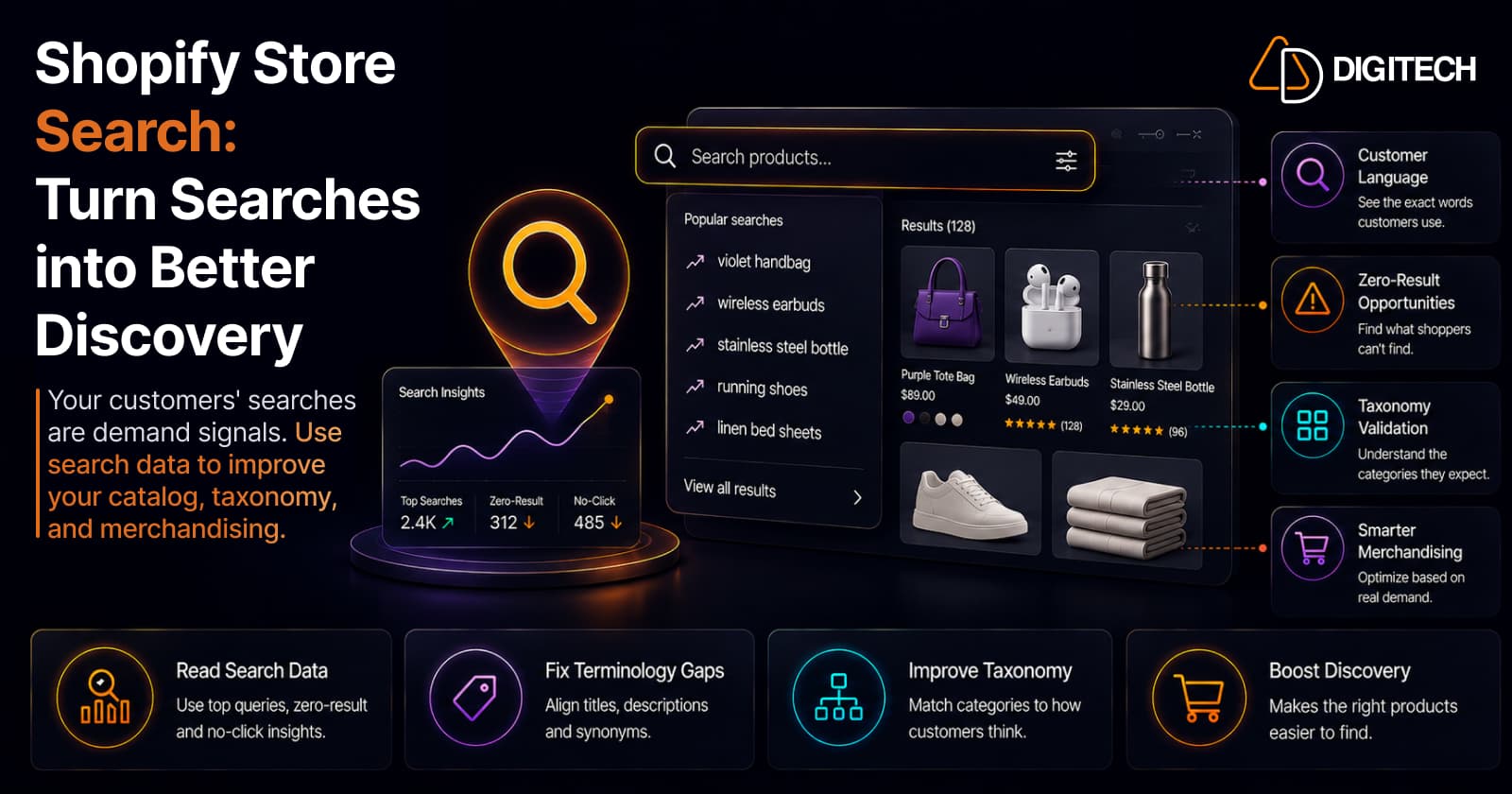
The short version: your search box is not just a navigation tool — it's a live feed of what customers want and how they describe it. Every query is a signal about demand, terminology, and where product discovery is breaking. Shopify reports your top and zero-result searches natively, on any plan. The opportunity isn't just making search work; it's reading what customers search for and using it to keep improving the store.
We build and optimize Shopify stores, so this is about using search as data, not as a widget. For the search experience itself, filters and relevance, see improving Shopify search and filters; this article is about what the searches themselves are telling you.
Why customer search behavior matters
A shopper who uses your search box usually has specific intent. They know roughly what they want and they're telling you, in their own words. That makes onsite search one of the most direct sources of customer insight you have.
Read collectively, searches reveal what products customers want, how they describe them, what's hard to find, what information they expect, and what may be missing entirely. Most of that intelligence sits unused in reports nobody opens.
What your customers' searches reveal
Treat search data as five distinct signals:
- Demand — which products and categories customers repeatedly look for.
- Terminology — the words customers use, which may differ from yours. A shopper searches "blue waterproof jacket" while your product is a "navy rain shell." Same item, missed connection.
- Product gaps — repeated searches for things you don't sell.
- Content gaps — searches for information (sizing, compatibility, care) your product pages don't answer.
- Catalog problems — products that are hard to find because product data is thin or inconsistent.
Each signal points to a different fix, so the first job is telling them apart.
Zero-result searches are business signals
A zero-result search is a query that returned nothing. It's the purest demand signal you get, because the customer stated exactly what they wanted and left empty-handed.
A zero-result term can mean several things: a missing product, wrong terminology, a missing synonym, thin product data, an out-of-stock item, or a catalog-organization problem. Consider:
- "violet handbag" returns nothing, but you sell "purple purses" — a terminology gap, fixed with naming or a synonym.
- "waterproof backpack" returns nothing because the attribute lives in an image, not the product data — a data gap.
- "kids' hiking boots" returns nothing because you genuinely don't carry them — a real product gap.
The discipline: don't assume every zero-result search means "add a product." Investigate the intent first. Often the product exists and the shopper simply couldn't reach it.
Turn search language into naming and taxonomy
Customer search terms are free copy research. When shoppers repeatedly search "running shoes for flat feet" but your catalog only says "stability trainers," that's a prompt to evaluate whether your product titles, descriptions, and collection names communicate what customers actually look for. The aim is natural, customer-facing language, not keyword stuffing.
The same data tests your taxonomy. If your internal category is "Outdoor Footwear" but customers search "hiking boots," "trail shoes," and "waterproof hiking shoes," your structure may not match how customers think. Those signals help you evaluate categories, product types, collections, and attributes, which is exactly the work in organizing your catalog with product taxonomy. Search tells you whether the taxonomy reflects your customers or just your team.
Search patterns can guide merchandising and reveal opportunities
Search demand is a useful input to merchandising decisions. If many customers search "waterproof jackets" heading into a rainy season, that product group probably deserves to be easier to find, featured, well-stocked, and surfaced in navigation. Rising search interest is an early signal worth acting on.
It also surfaces product opportunities. A repeatedly searched term can mean an existing product is hard to find, is named wrong, is out of stock, lacks a category, or is something you don't carry at all. Depending on which, the response might be merchandising, better product data, inventory planning, a new collection, or sourcing. Search demand is an input, though, not the decision — margin, inventory, availability, and strategy still govern what you actually promote.
Where the search data actually comes from
Be precise about your sources, because they differ in what they capture:
| Source | What it gives you | Notes |
|---|---|---|
| Shopify Search & Discovery | Searches by query, no-result searches, no-click searches, click & purchase rate | Free first-party app; last 30 days |
| Shopify Analytics reports | Top online store searches, top searches with no results | Available on any plan; longer date ranges |
| GA4 | Onsite search events and deeper funnel behavior | Requires site-search tracking to be set up |
| Google Search Console | Queries typed on Google that reach your store | Organic demand — different from onsite search |
| Apps / custom tracking | Search app analytics, bespoke signals | For needs beyond the native reports |
The practical point: Shopify natively shows your top searches and your zero-result searches on any plan, which is enough to start. Reach for GA4 or Search Console when you want to connect search to the wider funnel or to organic demand. Don't assume a metric exists until you've found it in one of these — check the report before you build a decision on it.
A simple way to analyze it
You don't need a data team. A repeatable pass:
- Collect the available search signals from your native reports (and GA4 if configured).
- Group similar searches so intent is clear — running shoes, running sneakers, and jogging shoes are one demand, not three.
- Identify the high-frequency searches, the zero-result terms, unexpected terminology, and obvious product gaps.
- Map each pattern to a catalog action using the table below.
- Measure whether discovery improved, fewer zero-results for fixed terms, more clicks and conversions on the affected products.
Match the signal to the action:
| Search signal | Likely action |
|---|---|
| Popular product search | Improve that product's visibility |
| Zero-result query | Investigate a product or catalog gap |
| Customer terminology differs | Review naming and synonyms |
| Repeated category search | Improve collection structure |
| Product searched but unavailable | Review inventory and merchandising |
| Informational search | Add the missing product/content detail |
These are starting points, not automatic rules.
Common Shopify search mistakes
- Ignoring the language customers actually use
- Treating zero-result searches as noise instead of demand
- Building products with thin or inconsistent data that search can't match
- Overstuffing product titles with keywords that read badly
- Ignoring availability, so search surfaces things people can't buy
- Never reviewing search behavior on a schedule
- Structuring the catalog around internal org charts rather than customer language
A simple search review cadence
Make it a habit, not a project:
- Weekly: a quick scan for unexpected spikes or new zero-result terms.
- Monthly: review popular searches, zero-result searches, new patterns, product gaps, and terminology differences.
- Quarterly: use the accumulated findings to revisit taxonomy, collections, product data, merchandising, and product opportunities.
A short, regular review beats an occasional deep dive, because search demand shifts with seasons, trends, and your own catalog changes.
When native search is enough, and when custom helps
For most stores, Shopify's native search plus clean, consistent catalog data covers it, and that should always be the first move. The native reports tell you what customers search, and disciplined product data lets search actually match it.
Custom development becomes relevant when the requirement genuinely exceeds native capability: complex product relationships, industry-specific search logic, custom ranking rules, external product databases, ERP or PIM integrations, or a highly customized discovery experience. The test is the business need, not catalog size, if native handles it, use native.
The bottom line
Your customers' searches aren't just queries to satisfy. They're a continuous signal about demand, terminology, catalog structure, merchandising, and product gaps, and it's a stream most stores never read. The strongest Shopify search strategy isn't only making the search box work; it's using what customers search for to keep improving the catalog behind it. Clean product data and clear catalog structure are what let those signals turn into better discovery.
If your store has product-discovery requirements that go beyond native search, AD Digitech can help evaluate the catalog structure, search experience, integrations, and custom development options. See our Shopify store development work, or talk to us about your product discovery.
Frequently asked questions
Does Shopify show me what customers search for?
Yes, natively. Shopify's free Search & Discovery app and the Analytics behavior reports show your top onsite searches, searches with no results, and searches with no clicks — available on any Shopify plan. For deeper analysis you can add GA4 site-search tracking, and Google Search Console shows the queries people type on Google to reach your store, which is a different signal from onsite search.
What is a zero-result search and why does it matter?
It's an onsite search that returned nothing. It's one of the clearest demand signals you have, because the shopper told you exactly what they wanted and got nothing back. It can mean a missing product, but more often it's a terminology gap (they searched 'violet handbag', you sell 'purple purse') or thin product data — so investigate the intent before assuming you need new inventory.
How can customer searches improve my product catalog?
They reveal the exact words customers use, which can inform product titles, descriptions, collection names, and synonyms; the categories they expect, which tests your taxonomy; and the demand they have, which informs merchandising and even sourcing. Onsite search is a continuous, free stream of customer language and demand — most stores just never read it.
Should I add a product every time people search for it?
No. A repeated search can mean the product is hard to find, named differently than you named it, out of stock, or genuinely missing. Investigate which, because the fix might be better naming or merchandising rather than new inventory. Treat search signals as starting points, weighed against margin, inventory, and strategy.
When do I need more than Shopify's native search?
When the business requirement genuinely exceeds it: complex product relationships, industry-specific search logic, custom ranking, external product databases, or ERP/PIM integration. Most stores should get native search and clean catalog data right first; custom development is for real gaps, not catalog size alone.
Building something on Shopify?
We design, build, and maintain Shopify apps, stores, and AI products — to the standard this article describes.
Related reading

Shopify Adds Stock Counts in Admin: How Merchants Can Verify Inventory Before Peak Season
Shopify stock counts let staff record what's on the shelf and let a manager approve the differences before inventory changes. Here's how the workflow works in admin and POS.
Read article
Shopify Adds Arabic, Urdu, and Hebrew Support: What Merchants Must Check Before Launch
Shopify improved RTL support for Arabic, Urdu and Hebrew in the admin, storefronts and checkout. Here's what's covered, what isn't, and what to test before launch.
Read article
Shopify Translate & Adapt Auto-Sync: How to Keep Translations Current Before BFCM
Translate & Adapt can now update translations weekly with Auto-sync. Here's who can use it, how it differs from Translate now, and how to plan translations before BFCM.
Read article
Shopify Flow Shipping Label Automation: Setup, Rules, and What Merchants Should Test Before BFCM
Shopify Flow can now buy shipping labels automatically for orders that match your rules. Here's how the action works, example workflows, and what to test before BFCM.
Read article
Shopify Automated Policies: 7 Things Merchants Should Check Before Enabling Them
Shopify can now generate and update your return, shipping, terms of service and contact policies from your store settings. Here's what to check before you turn automation on.
Read article
Shopify Purchase Order Analytics: How to Spot Stock Risks Before BFCM
Shopify Analytics now includes purchase order reports. Here's what each report shows, how to use them to spot stock risks before BFCM, and what they can't tell you.
Read article
Shopify Rollouts: How Merchants Can Safely Test Store Changes Before BFCM
Learn how Shopify Rollouts let merchants schedule, test, and launch store changes safely before BFCM, including themes, discounts, catalogs, and checkout.
Read article
Shopify Shop Checkout Gets Faster: What Merchants Need to Know
Shopify's October 5, 2026 Shop update brings faster checkout and carts that sync across devices. See how it works, who qualifies and what to check before BFCM.
Read article
Shopify Analytics Annotations: How Merchants Can Add Context to Their Store Data
Shopify Analytics annotations let merchants add campaign, pricing and operational notes to reports. See how they work, the limits, and how to use them for BFCM.
Read article